
The Contract Provider Invoicing process has been updated to support billing for BH Connect monthly bundles. This document explains what steps must be taken to configure the Invoice Generators for the BH Connect bundles and demonstrates how the bundles will appear on the Invoice Generator.
Setting Up the Invoice Generator
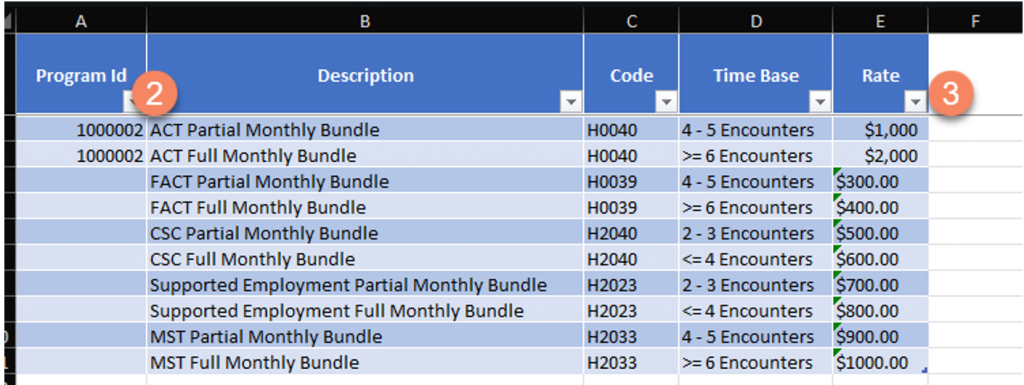
A new tab called BH Connect 2627 has been added to the Invoice Generator to support invoicing for the monthly bundles associated with EBP.
To set up the Invoice Generator:
- Navigate to the BH Connect 2627 tab.
- Enter the Program ID for the program in Column A.
Tip: If the Program ID is unknown, export the Contract Provider Charge Export for the program. The Program ID is included as a field on that report. - Update the Rate in Column E.
- If additional programs need to be set up, copy the monthly bundle rows into new rows as needed.
How Invoicing Works
The Invoice Generator determines which services are included in a bundle based on three criteria:
- Program ID – Must be entered into the BH Connect 2627 tab. See the Setting Up Invoice Generator section for details.
- Client ID.
- Mode of Delivery – Must be set to BH Connect Monthly Bundle.
Note: Services that do not have BH Connect Monthly Bundle listed as the Mode of Delivery will not be counted toward the bundle and will instead be invoiced as normal.
Invoice Detail Tab -What to Expect
When the Invoice Generator identifies services to be included in a monthly bundle, the Invoice Detail tab will reflect the following:
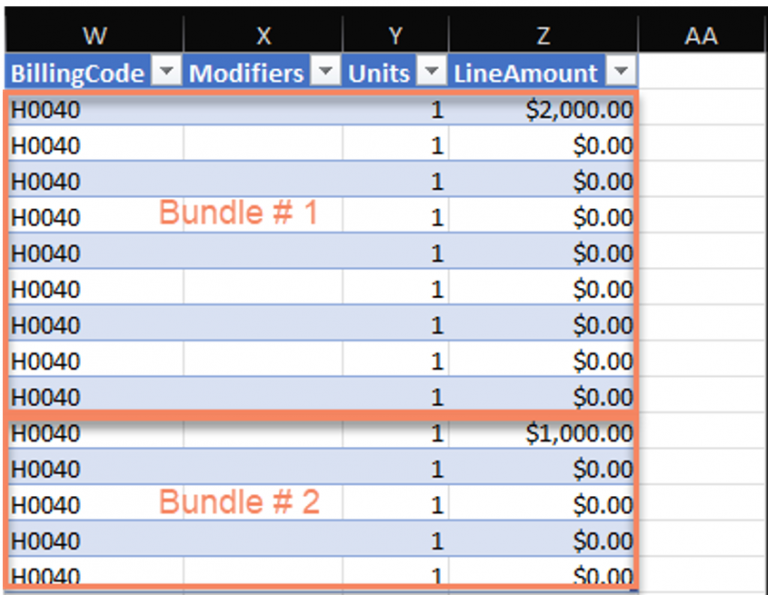
- The billing code will be updated to the HCPCS code associated with the bundle.
- The rate amount will appear in the Line Amount for only one service within the bundle. All remaining services in the bundle will display a $0.00 Line Amount.
Refer to the example below for what a full and partial bundle will look like on the Invoice Detail tab for the ACT bundle.
Monthly Bundle Calculation
The Invoice Generator applies DHCS’s guidance for how services should be counted toward the monthly bundle.
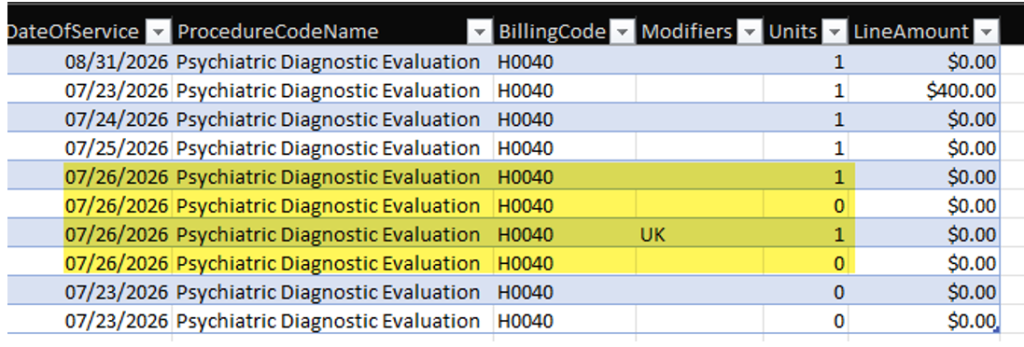
If a service does not qualify to be counted toward the bundle, but BH Connect Monthly Bundle is still listed as the Mode of Delivery, the HCPCS code associated with the bundle will still appear on the Invoice Detail tab however, the Units will show as 0. A Unit of 0 means the service is not counted toward the number of encounters needed to generate a full or partial rate but is still being included in the bundle.
When the Unit is set to 0:
- Multiple services on the same day: Only one service per day counts toward the bundle. Exception: If more than one service occurs on the same date of service (DOS) and one of those services has the UK modifier, then both the service with the UK modifier and the service without it are counted. This means each will show a Unit of 1, rather than 0.
- Telehealth audio-only visits: If the service location is telehealth audio-only (Location ID 2 or 3), it does not count toward the bundle. DHCS’s definition of face-to-face time for monthly bundles includes telehealth audio and video, but not audio-only.
Below is an example of how services that are not counted toward the bundle will appear. In this scenario, the client has multiple services performed on 07/26/2026. Only two of them are counted, since one of the services includes a UK modifier — this is indicated by the 1 shown in the Units column.
Below Minimum Threshold Error
If a client’s services are marked with a Mode of Delivery of BH Connect Monthly Bundle but the total number of services falls below the minimum required for the bundle, those services will not be invoiced.
Instead, they will appear on the Input Data tab highlighted in red with the following error message: “Below Minimum Threshold for Bundle. Please Review.”

This error is designed to prevent under- or over-payment to providers. When this error appears, the service should also be reviewed in SmartCare to determine whether the Mode of Delivery should be removed so the service bills to Medi-Cal as unbundled.