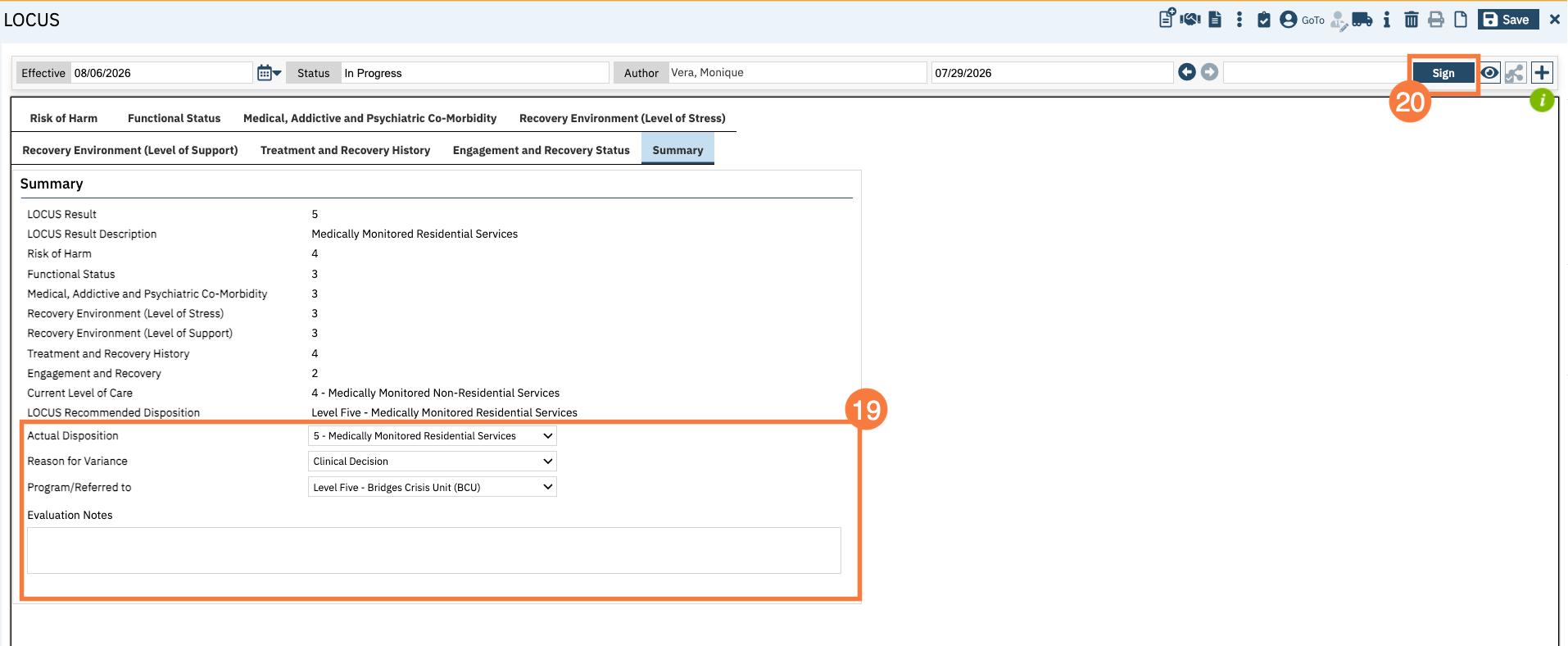
This article will walk you through how to complete the LOCUS in SmartCare. The form has 8 tabs: Risk of Harm, Functional Status, Medical/Addictive & Psychiatric Co-Morbidity, Recovery Environment (Level of Stress), Recovery Environment (Level of Support), Treatment and Recovery History, Engagement and Recovery Status, and Summary.
Note: In order to have access to this screen, your county must contract first with Deerfield Laboratory, which is the owner of this form. Once your county has the contract with Deetfield, your county admin will need to go through the procurement process with CalMHSA.
Additional training resources are available via Deerfield Laboratory once you contract with the organization. https://www.deerfieldsolutions.com/training
To complete this form in SmartCare, follow the steps below:
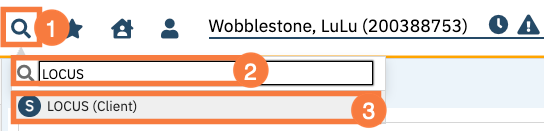
- With the client open, click the Search icon.
- Type LOCUS into the search bar.
- Click to select LOCUS (Client) from the search bar.
- The CDAG Program Enrollment window will open. Click to select the appropriate program.
- Click OK.

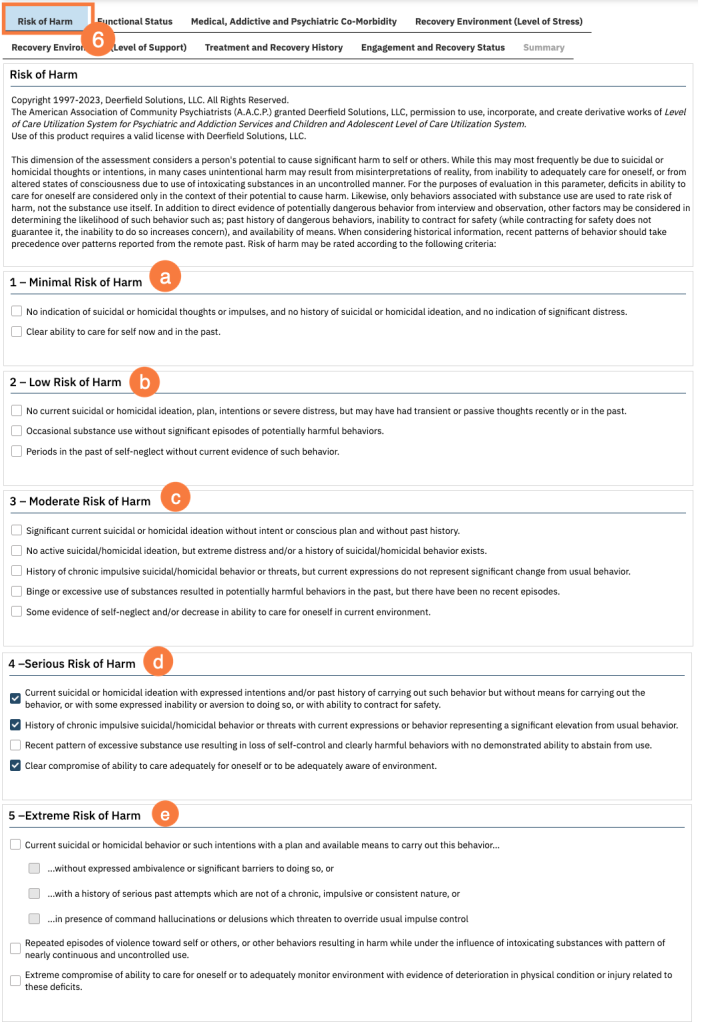
- The form will default to the Risk of Harm tab. This dimension of the assessment considers a person’s potential to cause significant harm to self or others. Determine the risk of harm and document the corresponding section. Click all the checkboxes that align with the risk of harm in one of the following sections:
- 1 – Minimal Risk of Harm.
- 2 – Low Risk of Harm
- 3 – Moderate Rish of Harm
- 4 – Serious Risk of Harm
- 5 – Extreme Risk of Harm
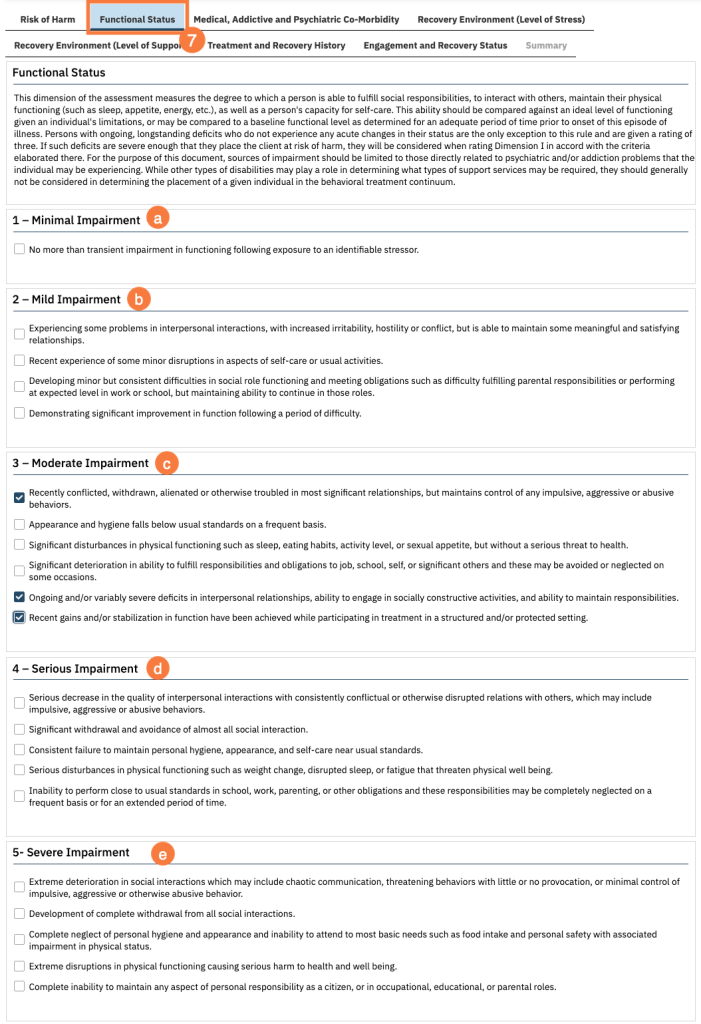
- Click the Functional Status tab. This dimension of the assessment measures the degree to which a person can fulfill social responsibilities, to interact with others, maintain their physical functioning (such as sleep, appetite, energy, etc.), as well as a person’s capacity for self-care. Determine the functional status and document the corresponding section.
- Click all the checkboxes that align with the functional status in one of the following sections:
- 1 – Minimal Impairment
- 2 – Mild Impairment
- 3 – Moderate Impairment
- 4 – Serious Impairment
- 5 – Severe Impairment
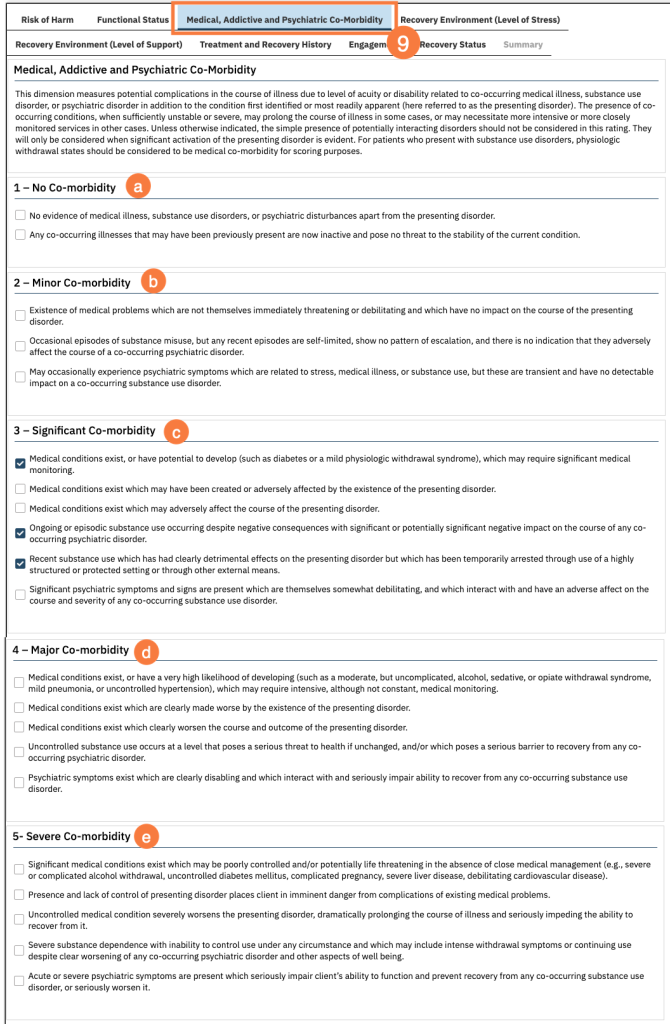
- Click the Medical, Addictive and Psychiatric Co-Morbidity tab. This dimension measures potential complications in the course of illness due to level of acuity or disability related to co-occurring medical illness, substance use disorder, or psychiatric disorder in addition to the condition first identified or most readily apparent (here referred to as the presenting disorder). Determine the co-morbidity status and document in the appropriate section.
- Click all the checkboxes that align with the co-morbidity status in one of the following sections:
- 1 – No Co-morbidity
- 2 – Minor Co-morbidity
- 3 – Significant Co-morbidity
- 4 – Major Co-morbidity
- 5 – Severe Co-morbidity
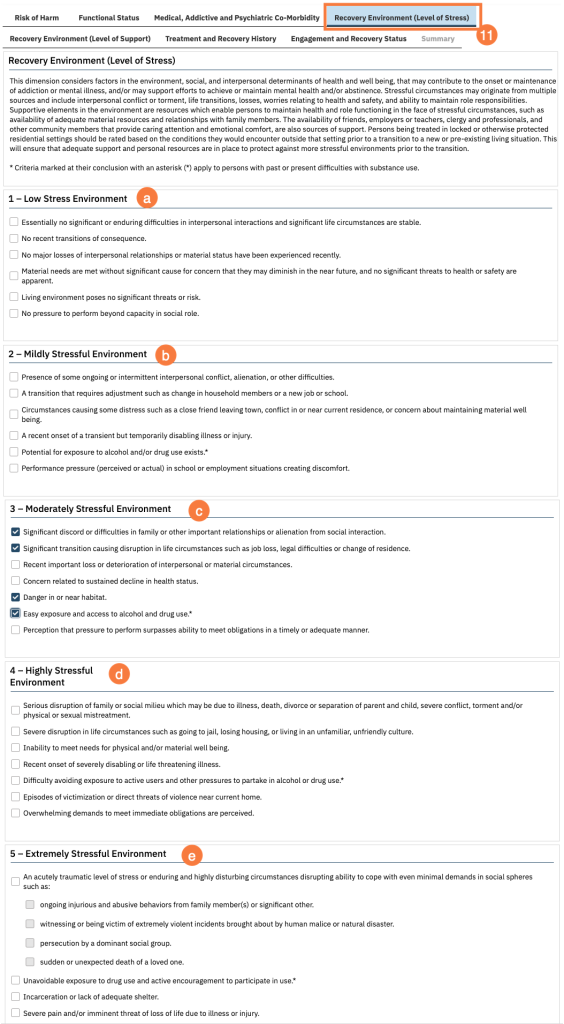
- Click the Recovery Environment (Level of Stress) tab. This dimension considers factors in the environment, social, and interpersonal determinants of health and well-being, that may contribute to the onset or maintenance of addiction or mental illness, and/or may support efforts to achieve or maintain mental health and/or abstinence. Determine the recovery environment status and document the corresponding section.
- Click all the checkboxes that align with the status in one of the following sections:
- 1 – Low Stress Environment
- 2 – Mildly Stressful Environment
- 3 – Moderately Stressful Environment
- 4 – Highly Stressful Environment
- 5 – Extremely Stressful Environment
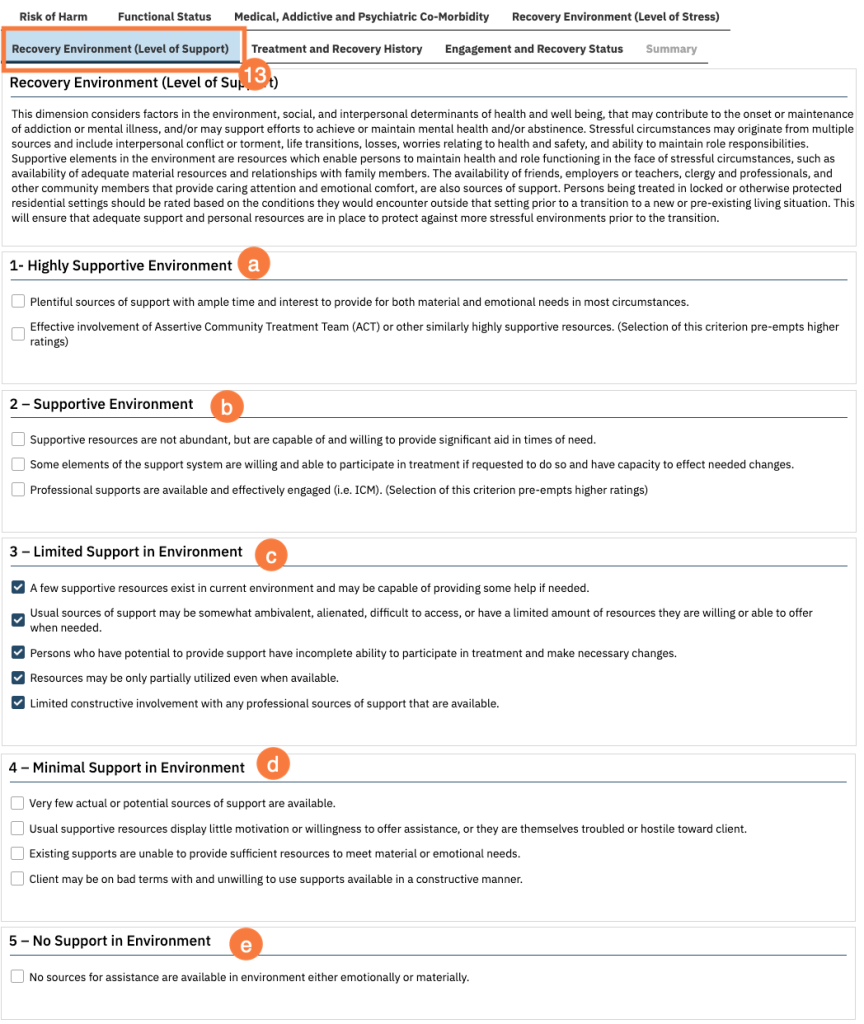
- Click the Recovery Environment (Level of Support) tab. This dimension considers factors in the environment, social, and interpersonal determinants of health and well-being, that may contribute to the onset or maintenance of addiction or mental illness, and/or may support efforts to achieve or maintain mental health and/or abstinence. Determine the level of support status and document the corresponding section.
- Click all the checkboxes that align with the status in one of the following sections:
- 1 – Highly Supportive Environment
- 2 – Supportive Environment
- 3 – Limited Support in Environment
- 4 – Minimal Support in Environment
- 5 – No Support in Environment
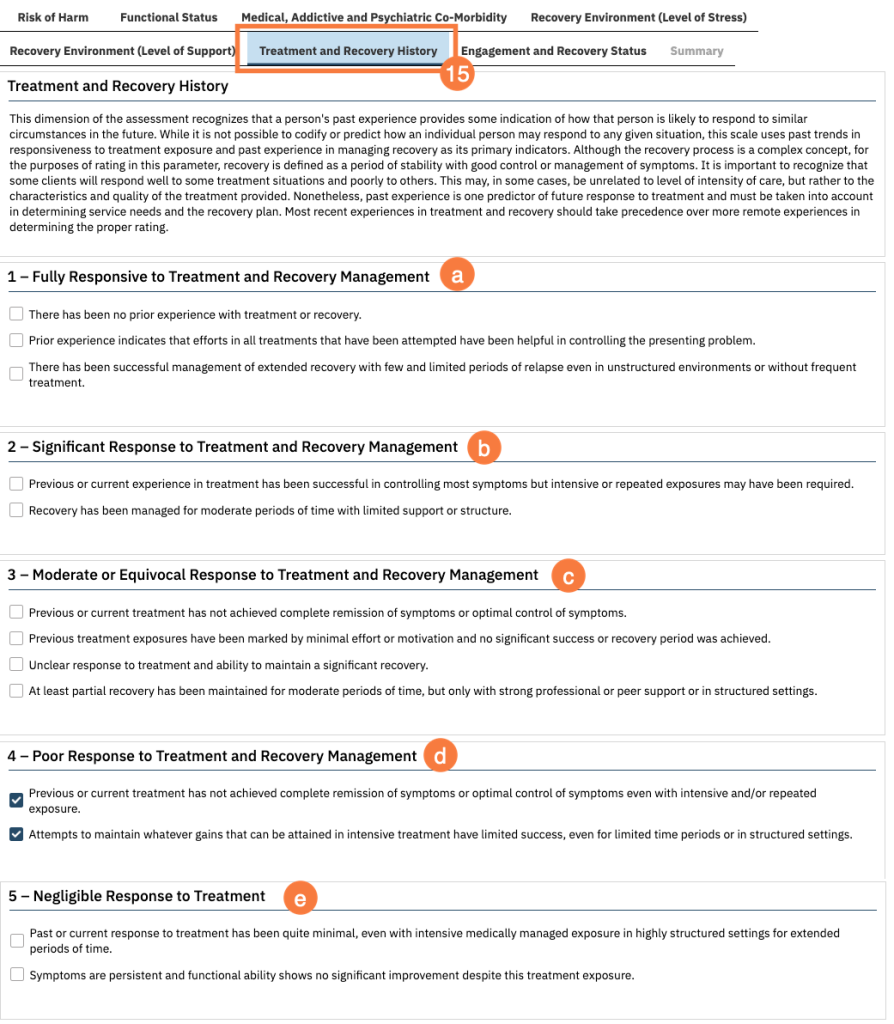
- Click the Treatment and Recovery History tab. This dimension of the assessment recognizes that a person’s past experience provides some indication of how that person is likely to respond to similar circumstances in the future. Determine the status and document the corresponding section.
- Click all the checkboxes that align with the status in one of the following sections:
- 1 – Fully Responsive to Treatment and Recovery Management
- 2 – Significant Response to Treatment and Recovery Management
- 3 – Moderate or Equivocal Response to Treatment and Recovery Management
- 4 – Poor Response to Treatment and Recovery Management
- 5 – Negligible Response to Treatment
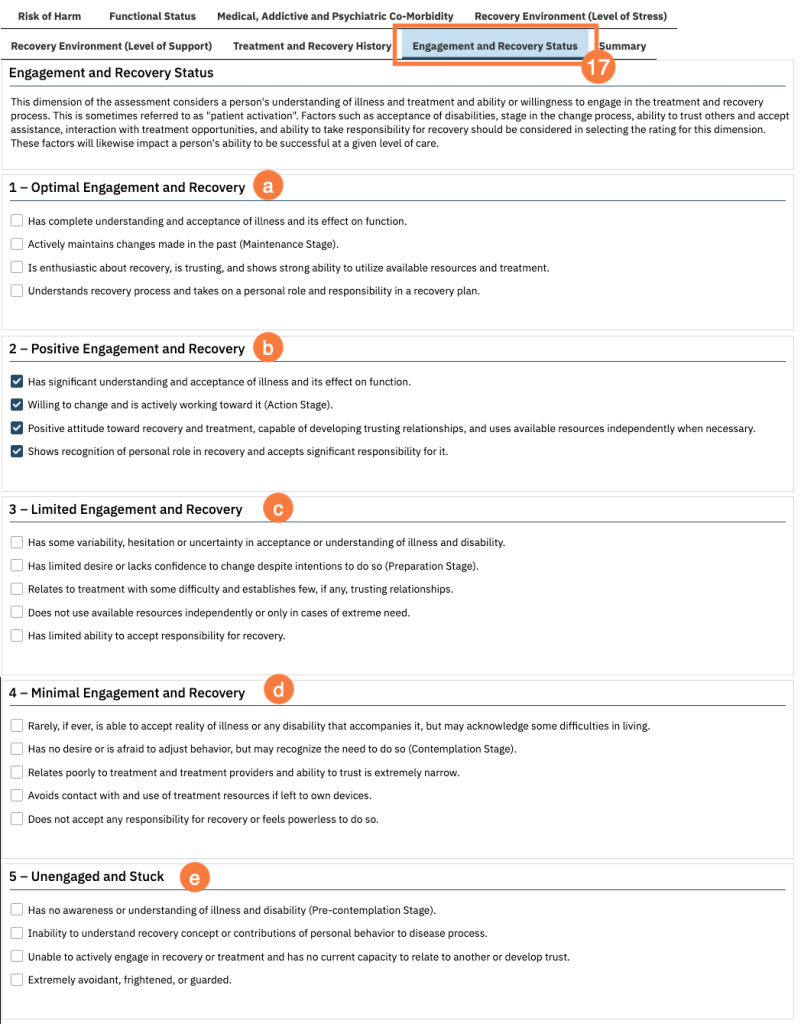
- Click the Engagement and Recovery Status tab. This dimension of the assessment considers a person’s understanding of illness and treatment and ability or willingness to engage in the treatment and recovery process. Determine the status and document the corresponding section.
- Click all the checkboxes that align with the status in one of the following sections:
- 1 – Optimal Engagement and Recovery
- 2 – Positive Engagement and Recovery
- 3 – Limited Engagement and Recovery
- 4 – Minimal Engagement and Recovery
- 5 – Unengaged and Stuck
- Click Summary tab. Review the information you have entered and complete the following fields:
- Actual Disposition
- Reason for Variance
- Program/Referred to
- Evaluation notes
- When you are all done, click Sign.