
This list page shows all clients in SmartCare that have an SUD-specific special population associated with their record. This will only include SUD special populations, as non-SUD special populations has their own list page.
You cannot add a client special population record from this list page, as you would need to go to the client-specific special population list page for that task. However, you can view and open existing special population records for clients. Once open, you can make changes to the record from the detail screen.
This list page is limited to only users with the SUD Add-On user role.
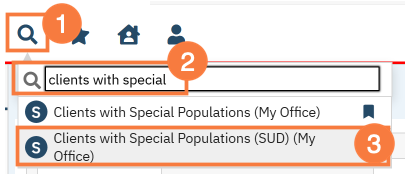
- Click the Search icon.
- Type “Clients with Special” into the search bar.
- Click to select Clients with Special Populations (SUD) (Client).
Filters
- The list page will open. Select the appropriate filter if needed. Click Apply Filter.
- Special Population Type – This is a list of special populations that can be assigned to a client. Leaving this blank will show all special populations. This is a single-select parameter.
- Start Date – This is the start of the date range parameter. This works in conjunction with the End Date and Date Range Type filters.
- End Date – This is the end of the date range parameter. This works in conjunction with the Start Date and Date Range Type filters.
- Date Range Type – This is the type of results you’re wanting to use the date range for. This works in conjunction with the Start Date and End Date filters.
- Active – The special population record was active during this date range. This includes records that were started prior to the date range and ended during or after the date range, records that were started during the date range and ended during or after the date range, and records that were started before or during the date range and do not have an end date. Use this option when attempting to find a list of clients who were designated this special population during a specific date range. (e.g. “What clients were considered Katie A during January 2025?”)
- Ended – The special population record has an end date within the date range. Use this option when attempting to find a list of clients who stopped being part of a special population during a specific date range. (e.g. “What clients were identified as no longer meeting Katie A requirements during January 2025?”)
- Started – The special population record has a start date within the date range. Use this option when attempting to find a list of clients who were designated as a special population during a specific date range. (e.g. “What clients were identified as Katie A during January 2025?”)

Columns
- Full Name – the name of the client
- Client Id – the client’s SmartCare identification number
- Special Population – the type of special population
- Start Date – the date the client was designated as that special population
- End Date – the date the client was designated as no longer that special population
- Comments – an open text field for explanations about that particular record
