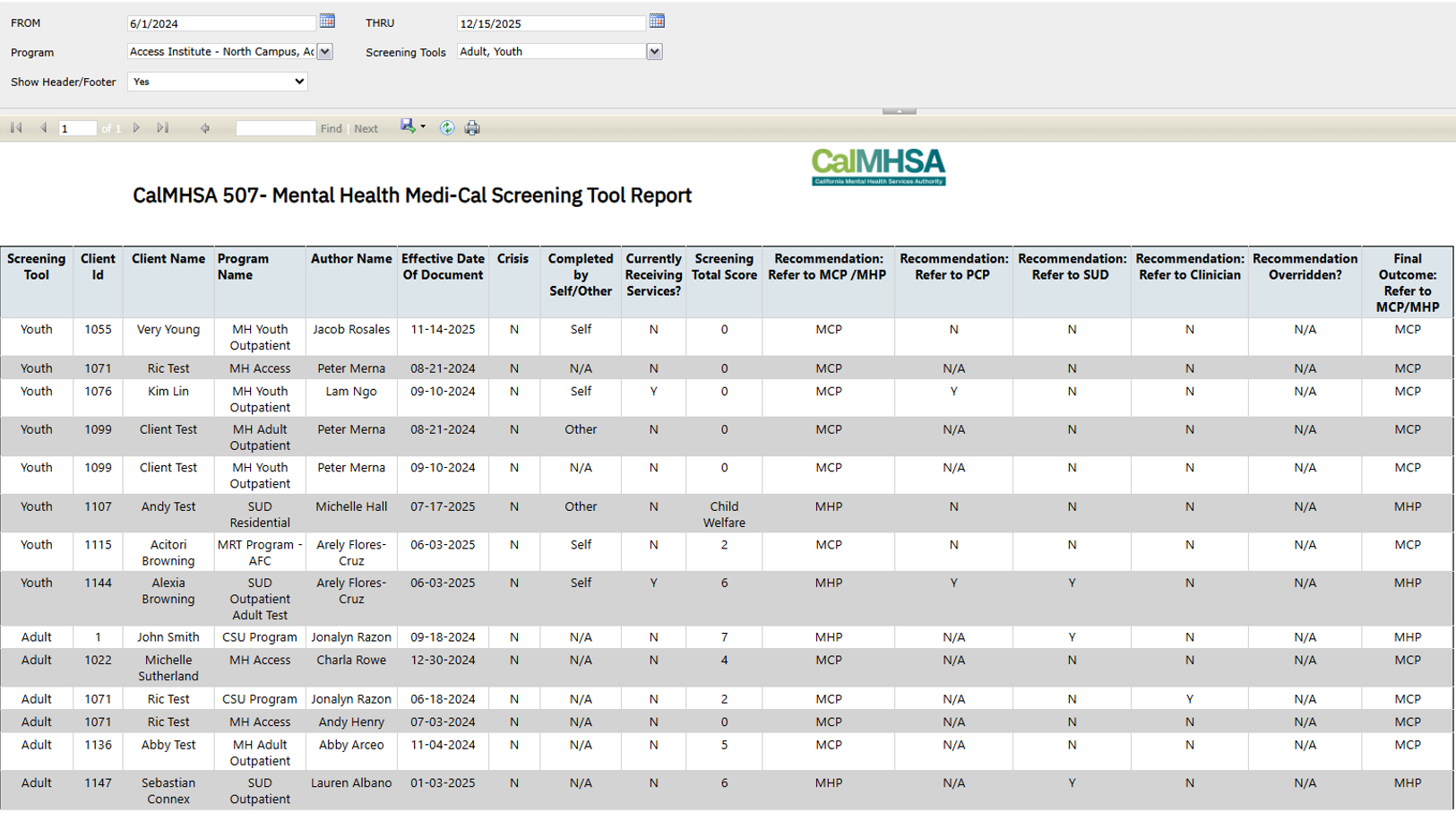
Report Description | ||||
This report is designed to pull data from both the “Adult Medi-Cal Screening Tool” and “Youth Medi-Cal Screening Tool”. It will determine on client’s MCP/MHP, PCP, SUD, and Clinician referral. It gives users options on filtering out the data between dates, programs, and screening tool. This report is base off both DHCS’s “Adult Screening Tool for Medi-Cal Mental Health Services” and “Youth Screening Tool for Medi-Cal Mental Health Services”. | ||||
Report Name | Menu Path | Client Based | Report RDL Name | |
CalMHSA 507 – Mental Health Medi-Cal Screening Tool Report | CalMHSA 507 – Mental Health Medi-Cal Screening Tool Report (My Office) | N | RDLCALMHSA_507_MHMedCalScreening_Report | |
Parameters | Data Type | Hidden | Comments | |
FROM | Date | N |
| |
THRU | Date | N |
| |
Program | Multiple select | N | A multiple select that allows users to select which programs the pulled data will be base off. | |
ScreeningTools | Single select | N | A single select that allows users to specify whether the report will only display Youth, Adult, or both screenings. Defaulted to both screenings. | |
ShowFooter | Single select | N | A toggle that allows users to specify whether the footer of the report will be hidden or not. This is mainly for exporting purposes. Defaulted to No – footer will be hidden. | |
ClinicalDataAccessGroupId | Integer | Y | Passed by system at report run time based on currently logged in CDAG | |
ExecuteedByStaffId | Integer | Y | Passed by system at report run time based on currently logged in CDAG | |
DataSets | Form(s) | CDAG enforced | Comments | |
Primary | Youth Medi-Cal Screening Tool, Client Information, Adult Medi-Cal Screening Tool | Y | This dataset is the report’s primary dataset. It pulls all signed Youth and Adult medi-cal screening tool document data whose effective date is within the date range set by the FROM and THRU parameters and are under one of programs selected by the Program parameter. The query is a union query, one focus on Youth screening tool and the other focus on Adult screening tool. Regarding the Youth section, the query pulls data from the Documents table with joins to the following tables: · Staff · Clients · Programs · CustomDocumentCalMHSAMHYouthScreeningTool Regarding the Adult section, the query pulls data from the Documents table with joins to the following tables: · Staff · Clients · Programs · CustomDocumentAdultMediCalMHScreenings Regarding both the Youth and Adult section, the query pulls data base on the following criteria: · All data being pulled are all non-softdeleted (ISNULL(RecordDeleted,’N’)=’N’) · Only pull data from the Documents table where the Status of the record is Signed (22) · Only pull data from the Documents table where the EffectiveDate of the record is within the date range setup by the FROM and THRU parameters · Only pull data from the Documents table where the ProgramId of the record is within what is selected by the Program parameter Regarding the Adult section, the query pulls data base on the following criteria: · Only pull data if the value ‘A’ is within what is selected by the ScreeningTools parameter Regarding the Youth section, the query pulls data base on the following criteria: · Only pull data if the value ‘Y’ is within what is selected by the ScreeningTools parameter Special Notes regarding the query: Logic regarding the value shown on the “Completed by Self/Other” column by order of operations. If any of the conditions is true, the logic will stop at that condition: For Youth data · CrisisSituation = ‘Y’ then display ‘N/A’ · CallingForSelf = ‘Y’ then display “Self” · CallingForSelf = ‘N’ then display “Other” · ELSE display “N/A” For Adult data · Display “N/A” as default Logic regarding the value shown on the “Currently Receiving Services?” column by order of operations. If any of the conditions is true, the logic will stop at that condition: For Youth data · CrisisSituation = ‘Y’ then display ‘N/A’ · CurrentlyReceivingTreatment = NULL then display ‘N’ · ELSE display CurrentlyReceivingTreatment value For Adult data · EmergencyOrCrisisSituation= ‘Y’ then display ‘N/A’ · CurrentlyReceivingTreatment = NULL then display ‘N’ · ELSE display CurrentlyReceivingTreatment value Logic regarding the value shown on the “Screening Total Score” column by order of operations. If any of the conditions is true, the logic will stop at that condition: For Youth data · CrisisSituation = ‘Y’ then display ‘N/A’ · CurrentlyReceivingTreatment = ‘Y’ AND CurrentlyReceivingMHTreatmentFrom = ‘MCP’ then display “Receiving Services at MCP” · CurrentlyReceivingTreatment = ‘Y’ AND CurrentlyReceivingMHTreatmentFrom = ‘MHP’ then display “Receiving Services at MHP” · LegalSystemCurrently =’Y’ then display ‘Juvenile Justice’ · InFosterCareCurrently = ‘Y’ then display ‘Child Welfare’ · HasBeenHomeless=’Y’ then display ‘Homeless’ · ScreeningTotalScore = NULL then display ‘N/A’ · ELSE display ScreeningTotalScore value For Adult data · EmergencyOrCrisisSituation = ‘Y’ then display ‘N/A’ · CurrentlyReceivingMHTreatment = ‘Y’ AND CurrentlyReceivingMHTreatmentFrom = ‘MCP’ then display “Receiving Services at MCP” · CurrentlyReceivingMHTreatment = ‘Y’ AND CurrentlyReceivingMHTreatmentFrom = ‘MHP’ then display “Receiving Services at MHP” · TotalScore = NULL then display ‘N/A’ · ELSE display TotalScore value Logic regarding the value shown on the “Recommendation: Refer to MCP/MHP” column by order of operations. If any of the conditions is true, the logic will stop at that condition: For Youth data · If Q1 was answered as ‘Yes’ (CrisisSituation = ‘Y’) THEN set value as ‘N/A’ · If Q4a was answered ‘MHP’ (CurrentlyReceivingMHTreatmentFrom = ‘MHP’) OR if Q6 was answered as ‘Yes’ (LegalSystemCurrently = ‘Y’) OR if Q7 was answered as ‘Yes’ (InFosterCareCurrently = ‘Y’) OR if Q9 was answered as ‘Yes’ (HasBeenHomeless = ‘Y’) THEN set value as ‘MHP’ · If Q4a was answered ‘MCP’ (CurrentlyReceivingMHTreatmentFrom = ‘MCP’) OR if the calculated total score is 5 or less (ScreeningTotalScore <= 5) THEN set value as ‘MCP’ · If the calculated total score more than 5 (ScreeningTotalScore > 5) or more THEN set value as ‘MHP’ · Else (if none of the conditions above is true) set value as ‘N/A’ For Adult data · If Q1 was answered as ‘Yes’ (EmergencyOrCrisisSituation = ‘Y’) THEN set value as ‘N/A’ · If Q4a was answered ‘MHP’ (CurrentlyReceivingMHTreatmentFrom = ‘MHP’) THEN set value as ‘MHP’ · If Q4a was answered ‘MCP’ (CurrentlyReceivingMHTreatmentFrom = ‘MCP’) OR if the calculated total score is 5 or less (TotalScore <= 5) THEN set value as ‘MCP’ · If the calculated total score more than 5 (TotalScore > 5) or more THEN set value as ‘MHP’ · Else (if none of the conditions above is true) set value as ‘N/A’ Logic on the value shown on the “Referred to PCP” column by order of operations. If any of the conditions is true, the logic will stop at that condition: For Youth data · CrisisSituation = ‘Y’ then display ‘N/A’ · (CrisisSituation = ‘N’ AND (dbo.csf_GetGlobalCodeNameById(MonthsSinceLastDrVisitCode) <> ‘0-6 Months’ AND AgeOfPerson <=3)) OR (CrisisSituation = ‘N’ AND (AgeOfPerson >= 4 AND dbo.csf_GetGlobalCodeNameById(MonthsSinceLastDrVisitCode) = ‘Over a year ago’)) OR (CrisisSituation = ‘N’ AND dbo.csf_GetGlobalCodeNameById(MonthsSinceLastDrVisitCode) = ‘Unsure/Don”t Know’) then display ‘Y’ · ELSE display ‘N’ For Adult data · Display ‘N/A’ as default Logic on the value shown on the “Referred to SUD” column by order of operations. If any of the conditions is true, the logic will stop at that condition: For Youth data · CrisisSituation = ‘Y’ then display ‘N/A’ · HavingTroubleDrugsOrAlcohol = ‘N’ then display ‘N’ · HavingTroubleDrugsOrAlcohol = ‘Y’ then display ‘Y’ · HavingTroubleDrugsOrAlcohol = ‘NULL’ then display ‘N/A’ For Adult data · EmergencyOrCrisisSituation = ‘Y’ then display ‘N/A’ · EmergencyOrCrisisSituation = ‘N’ AND (ConcernedAboutAlcoholDrugUse = ‘Y’ OR DangerousBehaviorCausedByAlcoholDrugs = ‘Y’) then display ‘Y’ · ELSE display ‘N/A’ Logic on the value shown on the “Referred to Clinician” column by order of operations. If any of the conditions is true, the logic will stop at that condition: For Youth data · CrisisSituation = ‘Y’ then display ‘N/A’ · CrisisSituation = ‘N’ AND (HavingSuicidalThoughts = ‘Y’ OR HavingSuicidalThoughts = ‘Y’ OR HasHomicidalThoughts = ‘Y’) THEN display ‘Y’ · ELSE display ‘N’ For Adult data · EmergencyOrCrisisSituation = ‘Y’ then display ‘N/A’ · EmergencyOrCrisisSituation = ‘N’ AND ThoughtsOfEndingLifeOrNotWakeUpInPastMonth= ‘Y’ then display ‘Y’ · ELSE display ‘N’ Logic on the value shown on the “Recommendation Overridden?” For Youth data · CrisisSituation = ‘Y’ or ScoreOverride = NULL then display ‘N/A’ · ELSE display the ScoreOverride value For Adult data · EmergencyOrCrisisSituation = ‘Y’ or ScoreOverride = NULL then display ‘N/A’ · ELSE display the ScoreOverride value Logic on the value shown on the “Final Outcome: Refer to MCP/MHP” column by order of operations. If any of the conditions is true, the logic will stop at that condition: For Youth data · CrisisSituation = ‘Y’ then display ‘Crisis’ · Recommendation_Overridden = ‘Y’ and Referred to MCP/MHP = ‘MCP’ THEN display ‘MHP’ · Recommendation_Overridden = ‘Y’ and Referred to MCP/MHP = ‘MHP’ THEN display ‘MCP’ · ELSE display the same value as the “Recommendation: Refer to MCP/MHP” value For Adult data · EmergencyOrCrisisSituation= ‘Y’ then display ‘Crisis’ · Recommendation_Overridden = ‘Y’ and Referred to MCP/MHP = ‘MCP’ THEN display ‘MHP’ · Recommendation_Overridden = ‘Y’ and Referred to MCP/MHP = ‘MHP’ THEN display ‘MCP’ · ELSE display the same value as the “Recommendation: Refer to MCP/MHP” value | |
Program | Programs (Admin) | Y | This query pulls in all active programs that is mapped to the login user’s session CDAG that is active during the time of the report being ran. | |
GetCountyLogo | N/A | N/A | County logo image for display on page header | |
Screening_Tool_Dataset | N/A | N/A | This dataset is used to populate ScreenTools parameter options. The options are hard coded. | |
|
|
| Default User Roles | |
|
|
|
| |