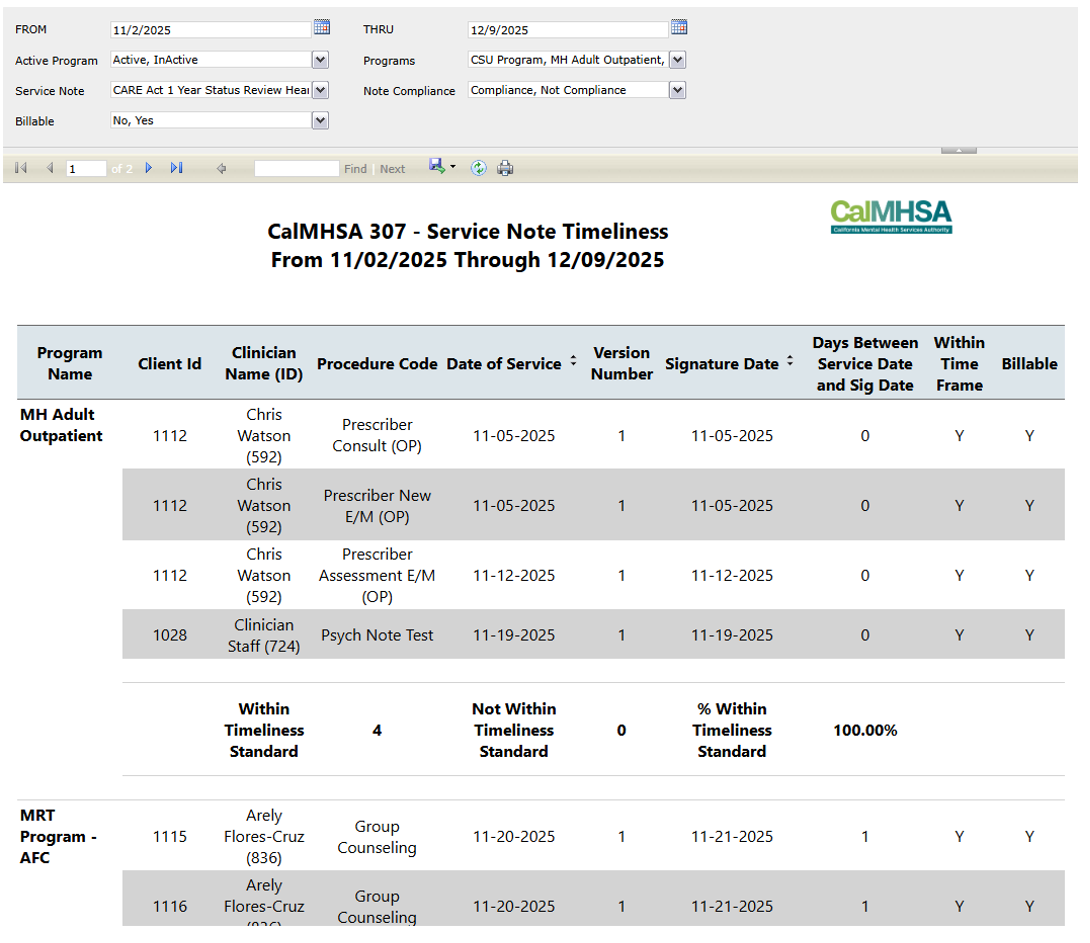
Report Description | ||||
This report is designed to display all service note’s timeliness by the included filters. It will include key details such as client ID, clinician name/ID, program name, date of service, and the number of days between the service date and service note’s signature. The report will summarize the service notes by showing the total number of notes completed within required timelines, those that fall outside of them, and the percentage of them within timeliness, broken down by program. Calculations regarding timeliness compliance are as such (Date of service being day 0): | ||||
Report Name | Menu Path | Client Based | Report RDL Name | |
CalMHSA 307 – Service Note Timeliness Report | CalMHSA 307 – Service Note Timeliness Report (My Office) | N | RDLCALMHSANoteTimeliness | |
Parameters | Data Type | Hidden | Comments | |
FROM | Date | N | A Date parameter that allows users to specify the beginning of the data range of which the report will be using to pull service data whose date of service is within. | |
THRU | Date | N | A Date parameter that allows users to specify the end of the data range of which the report will be using to pull service data whose date of service is within. | |
Active Program | Multi-Select Dropdown | N | A multi-select parameter that allows users to limit what is shown on the Program parameter by the Active status of a program. Users can select “Active”, “Inactive”, or a combination of both. | |
Programs | Multi-Select Dropdown | N | A multi-select parameter that allows users to specify what service note data will be shown on the report base on the service’s associated program. Programs shown on the parameter is determined by the Active Program parameter. | |
Service Note | Multi-Select Dropdown | N | A multi-select parameter that allows users to specify what service note data will be shown on the report base on the service’s note type. | |
Note Compliance | Multi-Select Dropdown | N | A multi-select parameter that allows users to specify what service note data will be shown on the report base on the service note’s timeliness compliance. Users can select “Compliance”, “Not Compliance”, or a combination of both. | |
Billable | Multi-Select Dropdown | N | A multi-select parameter that allows users to specify what service note data will be shown on the report base on the service’s billable status. Users can select “No”, “Yes”, or a combination of both. | |
ClinicalDataAccess GroupId | Integer | Y | Passed by system at report run time based on currently logged in Staff | |
ExecutedByStaffId | Integer | Y | Passed by system at report run time based on currently logged in Staff | |
DataSets | Form(s) | CDAG enforced | Comments | |
DateSet_Name | Where_in_the_UI_can_the_user_interact_with_Data | Y/N | What_the_Dataset_do | |
DataSet1 | Service Note (Client) | Y | This dataset is the primary dataset for the report. It is used to populate what is shown on the report. · Clients · Programs · ProcedureCodes · Staff · Documents · DocumentVersions · DocumentSignatures Pulls data base on the following criteria: · All records from all involve tables are non-softdeleted. · Only pulls Services records whose Status value is either 71 (Show) or 75 (Complete) · Only pull Documents records whose Status value is 22 (Signed) · Only pull DocumentSignatures records whose SignatureOrder value is 1 · Only pull Service records whose DateOfService value is within the data range setup by the FROM and THRU parameters · Only pull Service records whose Billable value is within what is selected in the Billable parameter · Only pull Service records whose ProgramId value is within what is selected in the Programs parameter · Only pull ProcedureCodes records whose AssociatedNoteId value is within what is selected in the Service Note parameter · Only pull Services records whose logic determined Crisis and DiffNumDays values (logic explained below) is one of the following: o Crisis = ’N’ and DiffNumDays > 3, then see if ‘N’ value is within the selected values on the Note Compliance parameter. o Crisis = ’Y’ and DiffNumDays > 1, then see if ‘N’ value is within the selected values on the Note Compliance parameter. o If none of the above is not true, then defaults to seeing if ‘Y’ value is within the selected values on the Note Compliance parameter Special Notes regarding the report: · Report determines which Services records are crisis by reviewing the associated ProcedureCodeId value. If the ProcedureCodeId value is within the following list, then the report will treat the service’s Crisis value as ‘Y’, else ‘N’: o 6 o 26 o 91 o 135 o 136 o 167 o 303 o 304 · The report determines Service Note timeliness by calculating the number of days between the date of service and the date the Service Note is signed. This difference is captured in DiffNumDays value. The logic of this is the following: o Calculations utilizes the Date table. o If the service note is a crisis note, then count number of days between Service Note’s date of service and Service Note’s signature date. o If the service note is not a crisis note, then count the number of days, whose IsWorkDay value is ‘Y’, between Service Note’s date of service and Service Note’s signature date. | |
Programs | Programs (Admin) | Y | Dataset is used to populate the Program parameter. Pulls data from the StaffClinicalDataAccessGroup table with LEFT OUTER JOINs to Programs and ClinicaldataAccessGroupPrograms table. · All records from all involve tables are non-softdeleted. · Only pull Programs records whose Active column value is within what is selected in the Active Program parameter. · Only pull StaffClinicalDataAccessGroup records whose ClinicalDataAccessGroupId matches with the value within ClinicalDataAccess GroupId parameter · Only pull StaffClinicalDataAccessGroup records whose StaffId matches with the values within the ExecutedByStaffId parameter | |
Billable | N/A | N | Dataset is used to populate the Billable parameter. Data is hard coded | |
ProgramActive | N/A | N | Dataset is used to populate the Active Program parameter. Data is hard coded | |
ServiceNoteDataSet | Procedure Codes (Admin) | N | Dataset is used to populate the Service Note parameter. Pulls data from the ProcedureCodes table with a INNER JOIN to DocumentCodes table. · All records from all involve tables are non-softdeleted. | |
GetCountyLogo | N/A | N/A | County logo image for display on page header | |
|
|
| Default User Roles | |
|
|
|
| |